Stop customer data and API keys from going into personal ChatGPT.
Your team already uses ChatGPT and Claude, often on personal accounts your Microsoft or Google licence can't see. Pastebreak checks every paste, file and send on those sites and stops the dangerous ones before they leave the laptop.
$149/month flat for up to 50 people after the trial. Card required, cancel any time.
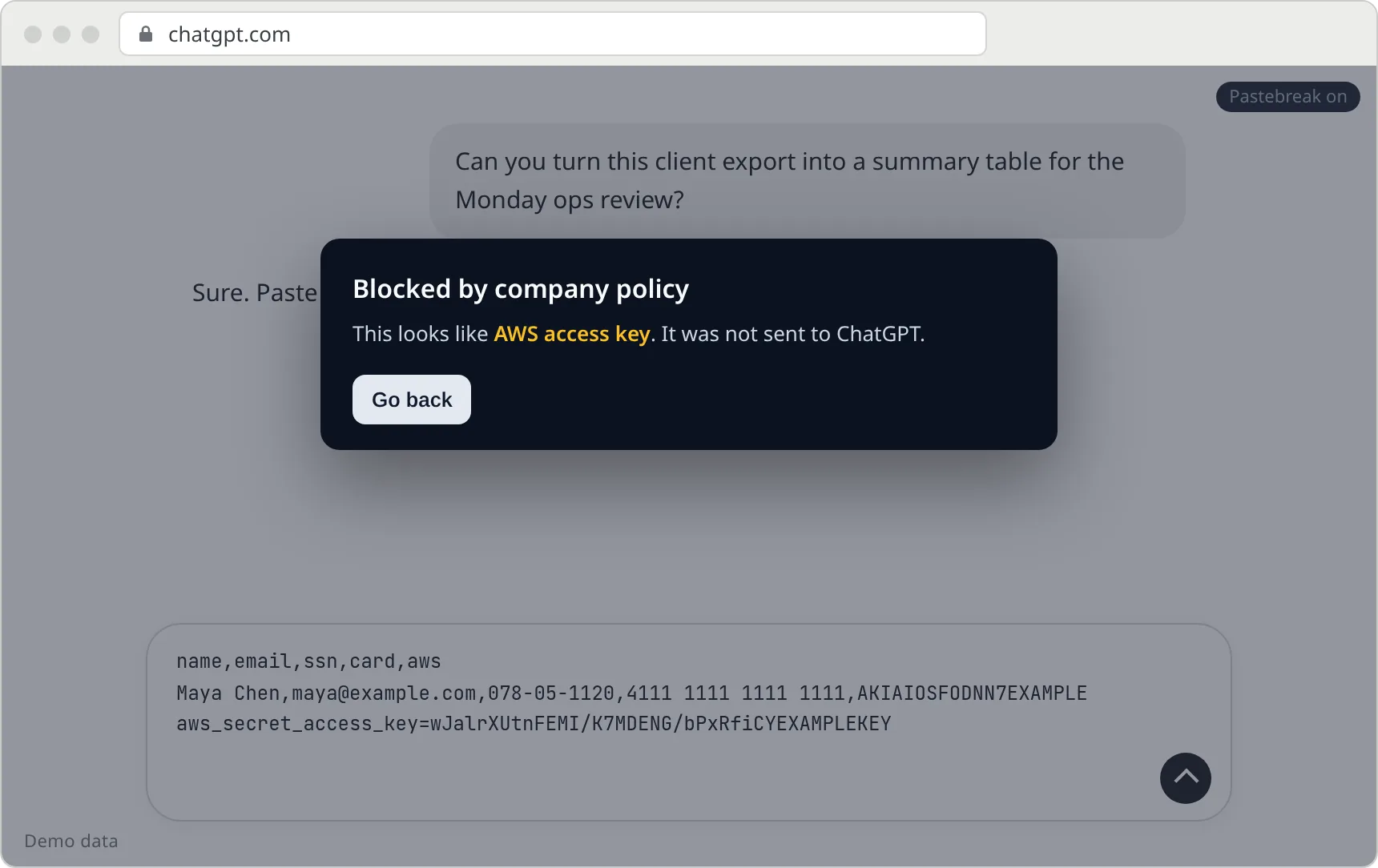
AKIAIOSFODNN7EXAMPLE pasted into chatgpt.com
What your team sees
Nothing, most of the time. When a paste matches a rule, the message stops at the browser and the person gets a plain explanation. No lecture, no ticket.

- Hard match
Blocks the dangerous stuff
Things with no innocent reason to paste: API keys and tokens, private keys,
.env/.pemfiles, card numbers that pass the bank checksum, valid-format SSNs, and customer or project names you add to a list. - Soft match
Warns on the grey areas
An email address, phone number or login token gets a "Check before sending" prompt. If someone sends anyway, it is logged. You can turn warnings into blocks, or into monitor-only.
- Site changed
Fails visibly
If Pastebreak can't find the message box it shows "unprotected". Selector updates arrive as a signed config file, so a fix doesn't wait on a browser-store review.
The text stays on the laptop. Only the event leaves.
Detection happens in the browser. This is the whole record we receive when a paste is stopped, next to what we never see.
Stays in the browser
- The message text
- The matched value: the key, the card number
- Attached file contents
- Any hash or fingerprint of the text
Sent to Pastebreak
- AI sitechatgpt.com
- CategoryAWS access key
- Actionblocked
- Time2026-10-07 09:41
- User label, if your admin set onemaya@northwind.example
- Random install ID, extension versiona91f…, 0.2.0
Event records are deleted after 90 days. Subprocessors: Cloudflare, Stripe, Resend (email), and Slack if you connect it. Details on the privacy page.
What you see
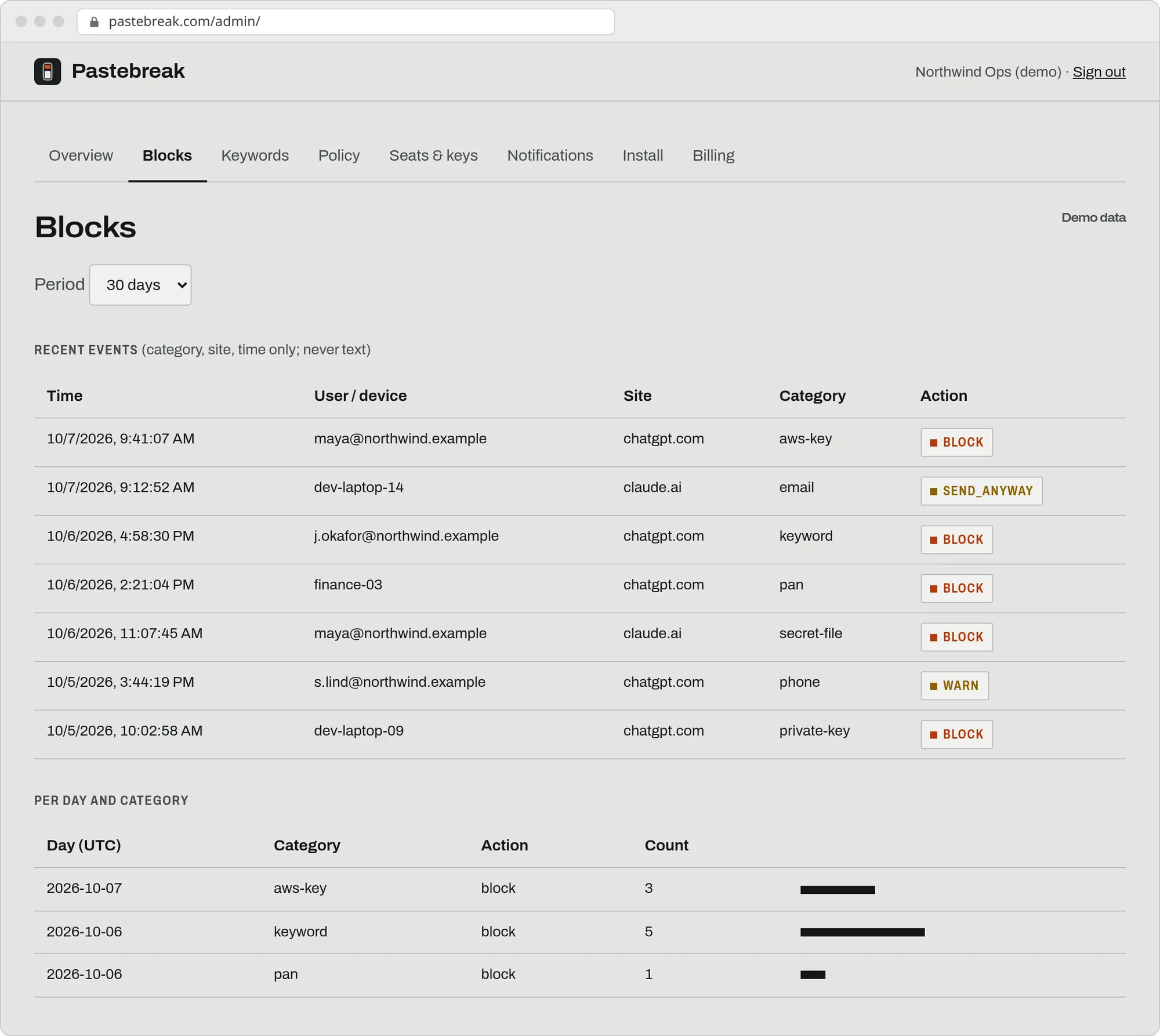
A dashboard of events by person, site and category, a keyword list, a policy switch, and a daily digest by email or Slack. Counts only.
- Day 1 · 20 min
Push it from the console you already use
Force-install from Google Admin or an Intune script, with your organization key in the policy. A force-installed extension can't be removed by the user. The install guide is one page.
- Week 1
Run it in monitor mode
Nobody is blocked. See what would have been caught, and add allow-list entries for anything noisy.
- Week 2 on
Turn blocking on
Flip the policy to enforce from the dashboard. Browsers pick up changes within 30 minutes.
Who it's for
Built for one kind of company, and honest about the rest.
A good fit
Founders, ops leads and IT people at 20–150 person companies on Microsoft 365 Business Premium or Google Workspace without the premium security add-ons, where staff open a personal ChatGPT or Claude tab next to the company tools.
Probably not
If you have a CISO, a SOC 2 requirement this quarter, or more than a couple of hundred people, a larger platform is probably the right call.
Honest comparison
Prices are public list prices as we understand them; check each vendor's current page before you decide. We tried to be fair, including where we lose.
Cheapest or strongest on that row
| Compared on | Pastebreak | Push Security | Microsoft Purview (Endpoint / browser DLP) | Chrome Enterprise Premium |
|---|---|---|---|---|
| Price | $149/mo flat, up to 50 people | about $5 per user per month | about $10 per user per month (add-on licensing) | about $6 per user per month |
| At 20 people | $149 | about $100 | about $200 | about $120 |
| At 30 people | $149 | about $150 | about $300 | about $180 |
| At 50 people | $149 | about $250 | about $500 | about $300 |
| Scope | One job: block secrets and customer data going into AI chat sites | Broader: identity, phishing, shadow SaaS, with AI-paste controls | Broad enterprise DLP across Microsoft 365 and endpoints | Broad Chrome data-loss controls, threat protection, reporting |
| Setup | Force-install from Google Admin or Intune, about 20 minutes | Agent/extension plus a platform to configure | Licensing, policies, device onboarding | Licensing and policy configuration in the admin console |
| Personal AI accounts | Yes: works on the page, whichever account is logged in | Varies by control; check | Depends on policy and browser; check | Depends on policy; check |
Where Pastebreak loses: below about 30 people Push is cheaper on paper, and any of the three covers far more than AI pasting. If you already own Purview or Chrome Enterprise Premium and have configured it to stop this, keep it. Pastebreak is for the company that wants this one problem solved at one flat price, without buying and configuring a platform.
What it does not cover
It is a seatbelt for accidents, not protection against a determined insider.
- Personal phones and personal laptops. It runs on managed work browsers.
- Desktop AI apps and coding agents, such as Claude desktop, Cursor, or Copilot in an IDE.
- Images, PDFs and Office files. Text files are scanned, first 64 KB.
- Hand-typed text that doesn't match a rule.
- Other AI sites, for now. Gemini, Copilot and Perplexity support is built but still in testing, so we don't promise it yet.
- A brand-new site change can leave a gap for a few hours. It shows "unprotected" while it does.
Pricing
Questions
Including the ones a careful IT person asks first.
Do you see what my team types?
No. The extension reads the text in the browser to check it, and prompt text is never sent to our servers. We receive: event type, AI site, time, the action taken, a user label and a random install ID. See the privacy page.
Will it annoy my team with false positives?
Hard blocks are kept for things with no innocent reason to paste. Softer matches (an email address) only warn. Start in monitor mode for a week, and add anything noisy to the allow-list from the dashboard.
Can employees turn it off?
A force-installed extension can't be removed by the user. Incognito windows and other browsers are an admin setting in Google Admin and Intune; our install guide shows the two settings.
What happens when ChatGPT or Claude changes its page?
If Pastebreak can't find the message box it shows "unprotected" instead of pretending. Selector updates are delivered as a signed config file, so a fix doesn't wait on a browser-store review. Honestly: this is a new product and a site change can still leave a gap for a few hours.
Which browsers?
Chrome and Microsoft Edge (Edge installs Chrome Web Store extensions).
How are seats counted?
By browser installs that check in during the last 30 days. The limit is 50; going slightly over triggers a notice, not a shutoff.
Do you have a SOC 2 report?
Not yet. We're a new company. The design keeps risk small: detection runs on your laptops, we never receive prompt text, and we store only event metadata for 90 days. Subprocessors: Cloudflare, Stripe, Resend (email), and Slack if you connect it. We'll answer a security questionnaire of up to about 30 questions within 48 hours. If your customers or auditors require a SOC 2 Type II report from every vendor this year, we're probably not the right choice yet.
How do I cancel?
From the billing portal in the dashboard, any time. Protection stops at the end of the paid period.